Linked Lists
-
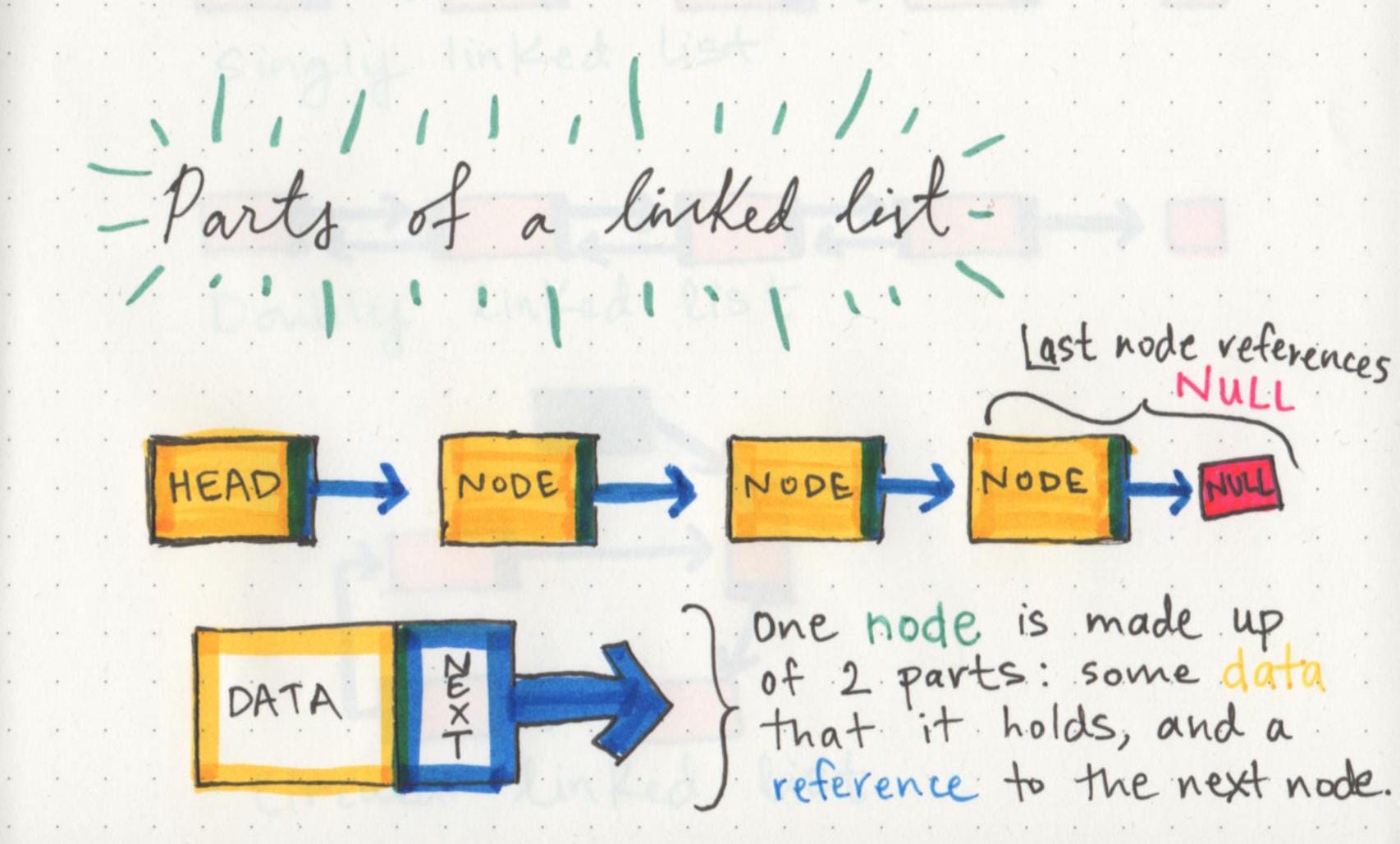
linked list is a collection of nodes, starting with head object that will be null when the linked list is empty, then when adding the first node will update the value of the head to this node object, including the next propert that will point to the reference of the next node if it exist or null if it was the last node in the linked list.
-
if we add a node to the first BigO of time will be O(1), but if we add between nodes or at the end, BigO of time will be O(n). and in the both cases the BigO of space will be as the value of nodes, and mostly will be O(1).
-
there are two types of linked lists : singly & doubly; the difference is the singly only have one pointer to the next node. but the doubly has two pointers; the first one for the next node and the second one for the previous node.
-
Singly: Singly refers to the number of references the node has. A singly linked list means that there is only one reference, and the reference points to the next node.
-
Doubly: Doubly refers to there being two (double) references within the node. A doubly linked list means that there is a reference to both the next and additionally the previous node.
Traversing
As you traverse a linked list, you cannot use a forEach or a for loop. We are relying on the Next value to guide the node to the next reference point. A next property is exceptionally important because it will lead us to the next node and allows us to extract data appropriately.
So what can you use to traverse?? The best approach is to use a while() loop. This will allow us to continually check that the next node is the list is not null.
Example
ALGORITHM Includes (value) // INPUT <– integer value // OUTPUT <– boolean
Current <– Head
WHILE Current is not NULL IF Current.Value is equal to value return TRUE
Current <– Current.Next return FALSE
What took place
1. We first create Current at the Head to guarantee we are starting from the beginning.
2. We create the while loop and this will only run is the node that Current is pointing too is not null.
3. Once we are in the while loop, we are checking if the value of the current node is equal to the value that we were looking for.
4. If the Current node does not contain the value we are looking for, we must move the current to the next node that is being referenced.
5.At this point, the while loop is run again and steps 3 & 4 will continue until Current reaches the end of the LinkedList.
Adding a Node
Order of operations is extremely important when it comes to working with a Linked list. Each of your links and nodes should be properly assigned.
Prerequisites
When constructing your code, keep in mind that a Node class will be passed in to each node that has a value.
When constructing your code, a few things to keep in mind.
-
When making your Node class, consider requiring a value to be passed in to require that each node has a value.
-
When making a Linked List, you may want to require that at least one node gets passed in upon instantiation. This first node is what your Head and Current will point too.
What’s a Linked List, pt1
- data structures
- ways of organizing our data.
- linked lists are a linear data structure, that means we traversed over the data sequentially.
- arrays and linked lists are linear data structure.
- array is a static data structure, that means when the array created will allocate a certain space in memory, and this will be fixed even the number of elements inside the array decreased or increased. and every time will allocate the same space directly.
- linked lists are a dynamic data structure, that means every time we add a new element or node inside the linked list will allocate a small space for this element only, and every element will take a special space for it when it’s created.
- also in dynamic data structure, the allocated spaces will be in different places depending on the element itself. but in static will be at the same place.
What’s a Linked List, pt2
- Big O Notation is a way of evaluating the performance of an algorithm.
- Big O determine how much the time & space we need to run this algorithm.
- O(1) : means i need a constant time & and same space, and doesn’t matter how much the elements we have or how huge our input is.
- O(n) : means that as our input grows, the space and time that we need to run that algorithm grows linearly.
- a linked list is usually efficient when it comes to adding and removing most elements, but can be very slow to search and find a single element.